

In today’s hospitality world, being listed on multiple online travel agencies (OTAs) is very important. It helps you get more bookings and more guests. One platform many hoteliers forget, but should use, is HRS (Hotel Reservation Service). HRS is used by many companies and business travelers around the world.
In this guide, we will explain how to list your hotel on HRS, how to connect it with your PMS and channel manager, and how to manage it easily to get more bookings.
Why HRS is Useful for Hoteliers
HRS is not like other OTAs that focus on leisure travelers. HRS is mainly used by business travelers and corporate clients. If your hotel is near business areas, airports, or conference centers—and you offer services like Wi-Fi, early check-in, and invoices—then HRS is a great option for you.
What You Get When You List on HRS
What You Need to Get Started
Before listing your hotel, make sure you have the following ready:
Step-by-Step: How to List Your Hotel on HRS
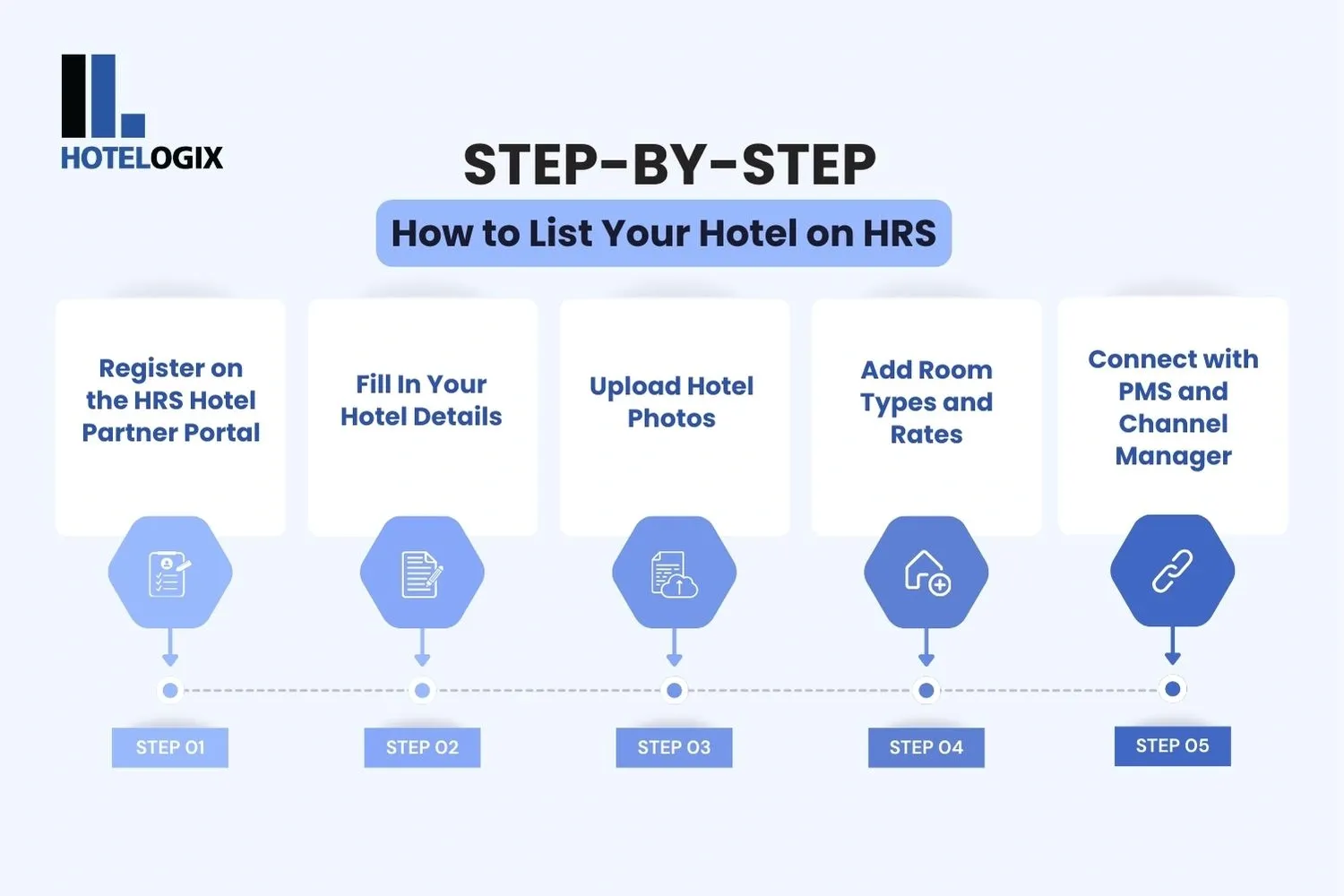
Step 1: Register on the HRS Hotel Partner Portal
Go to the HRS Hotel Portal and submit your hotel details. After approval, you will get login details for the Hotel Service Portal (HSP).
Step 2: Fill In Your Hotel Details
Inside the portal, complete your hotel profile:
- Hotel name and star rating
- Location and map details
- Hotel description
- Amenities and services (like Wi-Fi, restaurant, etc.)
Step 3: Upload Hotel Photos
Upload up to 50 good-quality photos. Include:
- Outside view of your hotel
- Reception and lobby area
- All room types
- Conference/meeting rooms
- Breakfast area or restaurant
Tip: Use natural light and take real photos of your hotel. Avoid using edited or stock images.
Step 4: Add Room Types and Rates
In the portal, create all your room categories and rate plans. Include:
- Room names (Standard Room, Deluxe Room, etc.)
- Number of guests allowed
- Rate types (corporate, best available rate, etc.)
- Taxes, cancellation policy, and breakfast details
Step 5: Connect with PMS and Channel Manager
If you’re using a Property Management System (PMS) or channel manager, connect it with your HRS listing. Most systems like Preno,Cloudbeds, or SiteMinder offer this.
Integration Checklist:
When connected, all updates happen automatically—no need to log in and change availability every time.
How to Manage Availability and Promotions
To stay competitive, you must manage your availability and rates regularly.
Use the Calendar
Through your channel manager or the HRS portal, you can:
- Open and close rooms for sale
- Add blackout dates (like maintenance days)
- Set minimum stay rules
- Control check-in/check-out days
Set Promotions
HRS allows you to create special rates for business guests or offer packages. These can be managed through your channel manager or directly in HRS.
Tips to Get More Bookings from HRS
Once your hotel is listed, here’s how you can improve your visibility and attract more guests:
1. Highlight Business-Friendly Services
Mention the services that business travelers care about:
- High-speed Wi-Fi
- Desk in the room
- Early check-in and late check-out
- Parking and invoice-ready billing
2. Keep Your Listing Updated
Make sure your hotel profile is always current:
- Update room photos if you renovate
- Refresh descriptions every few months
- Add or remove services when needed
- Reply to guest reviews and maintain a good rating
3. Track Bookings Using Your PMS
Your PMS will show booking data from HRS. Use it to:
- Track number of bookings and average rate
- See cancellation trends
- Understand peak days for business guests
This data, when combined with a good revenue management system, helps you decide the best rates and availability.
Best Tools to Help You Manage HRS Bookings
Here are some software options hoteliers like you are using to stay on top of things:
Why Hotelogix is a Smart Choice for Managing Your HRS Listing
Why Hoteliers Like It:
Hotelogix offers real-time syncing between OTAs, helping you avoid double bookings. You also get helpful reports, easy calendar views, and automation for managing bookings—saving you time and stress.
Is HRS Right for Your Hotel?
If your hotel serves business travelers or is near a business area or airport, HRS is a good fit. It helps you connect with companies, travel managers, and corporate guests who book frequently and often return.
You get more control over your rates, better tools to manage your listings, and a strong chance to increase your bookings—especially when your HRS listing is connected to a PMS and channel manager.